AI Character Sheet Generator
Describe a character in three boxes and get a complete editorial reference sheet — head angles, expressions, close-ups, and outfit views — as a single image.
One run produces a complete editorial casting sheet as a single high-resolution image: a profile column, eight head angles, five expressions, eight detail close-ups, full-body outfit views with a wardrobe breakdown, hair and face analysis, and color palette notes — with the character perfectly identical in every panel. No reference photo needed; three text boxes drive everything.
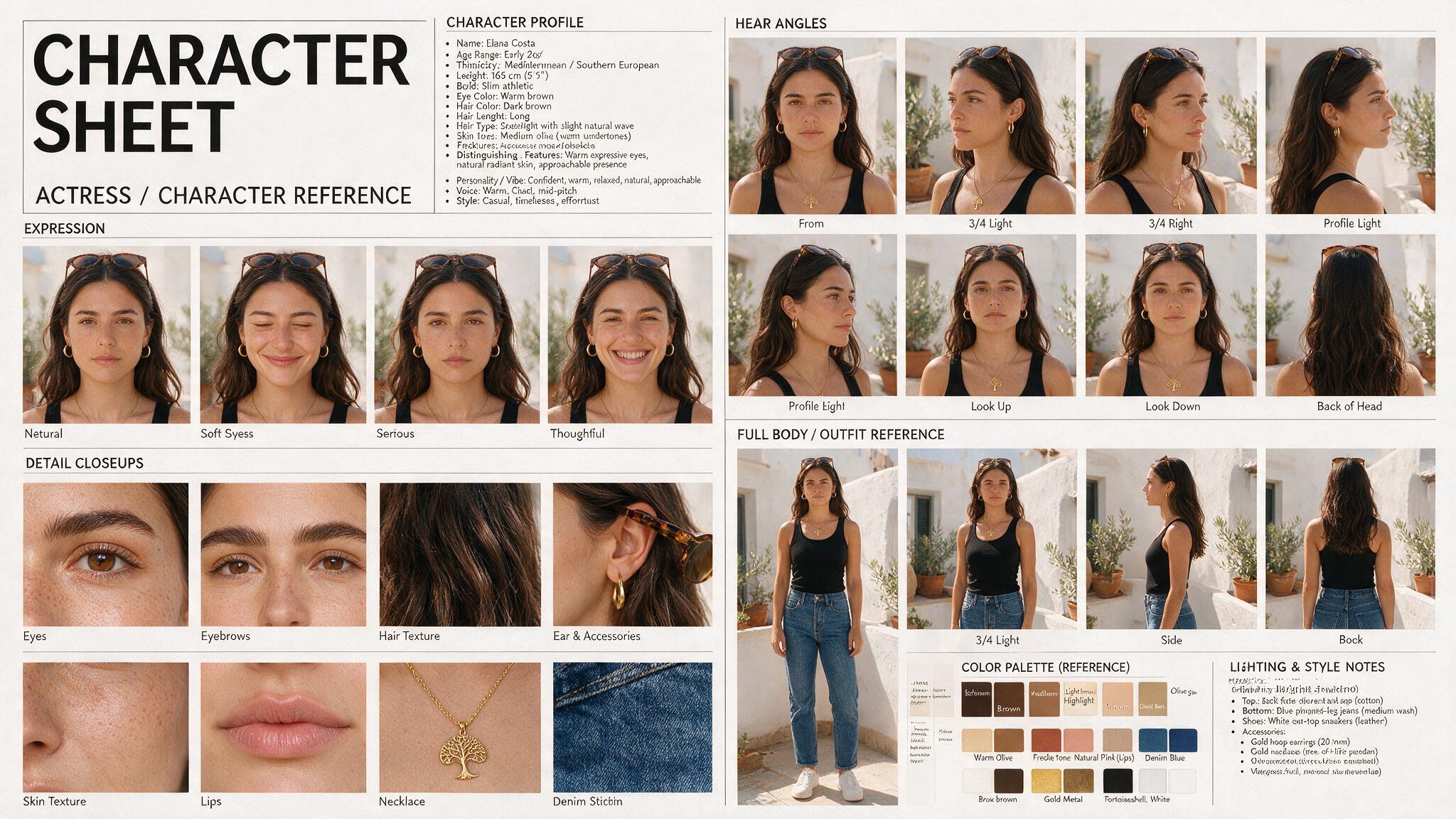
One run produces a complete editorial casting sheet as a single high-resolution image: a profile column, eight head angles, five expressions, eight detail close-ups, full-body outfit views with a wardrobe breakdown, hair and face analysis, and color palette notes — with the character perfectly identical in every panel. No reference photo needed; three text boxes drive everything.
Use cases
Concept art and world-building
Lock a character's canon look before commissioning illustrations or building scenes — one sheet answers every 'what do they look like from the side' question.
Consistent AI character pipelines
Use the sheet as a reference image in image-to-video and character workflows so your AI character stays the same person across generations.
Casting and creative pitches
Turn a written character brief into a visual casting sheet clients can react to in minutes rather than days.
Frequently asked questions
A tool that turns a written character description into a structured reference sheet — the multi-angle, multi-expression layout artists and studios use to keep a character consistent across scenes and media.
No. The sheet is generated entirely from your three text inputs — identity, outfit, and vibe. If you want to build sheets from an existing face photo instead, Scenetra's Character Reference Grid workflow does exactly that.
A profile column, 8 head angles, 5 expressions, 8 detail close-ups, full-body outfit views with breakdown, hair and face analysis, and a color palette — all in one image, same character in every panel.
The default layout is a photorealistic editorial sheet. Describing a stylized look in the character description shifts the rendering, but for dedicated anime sheets you may want to adapt the prompt on the underlying board.
New accounts include 100 free credits, and a sheet costs well under that — so your first several sheets are effectively free. After that, buy credits.
Yes — download the sheet and use it as a reference input for image-to-video, character video, or consistency workflows inside Scenetra to keep the same character everywhere.
How it works
Fill in the form
Upload your images and enter your prompts — no node editor needed.
Generate
Hit generate and the AI workflow runs automatically behind the scenes.
Download or customize
Get your results instantly, or open in the full workspace to tweak everything.
Models behind this tool
Related tools
Consistent Character Generator
Turn one face photo into a 12-angle, identity-locked character reference grid — profiles, expressions, and close-ups of the same person.
AI Character Creator
Create a complete AI character from a text description — casting portrait, upscaled master face, and identity-locked reference sheets for angles, emotions, hair, wardrobe, and body.
AI Motion Transfer
Copy the motion from any video onto up to four AI characters — each performs the exact same dance, gestures, or delivery, in sync.
AI Product Photography
Upload one product photo and get four professional lifestyle scenes — kitchen, garden, studio, and living room — background-removed, restaged, and upscaled to crisp detail.