AI Product Photography
Upload one product photo and get four professional lifestyle scenes — kitchen, garden, studio, and living room — background-removed, restaged, and upscaled to crisp detail.
One run takes your photo through a full product-photography pipeline: background removal, AI staging into four distinct scenes — marble kitchen counter, sunlit garden table, dramatic studio backdrop, and cozy living room — and a crisp 2x upscale on every output. Four PDP-ready images that replace a $300+ shoot for under a dollar of compute.
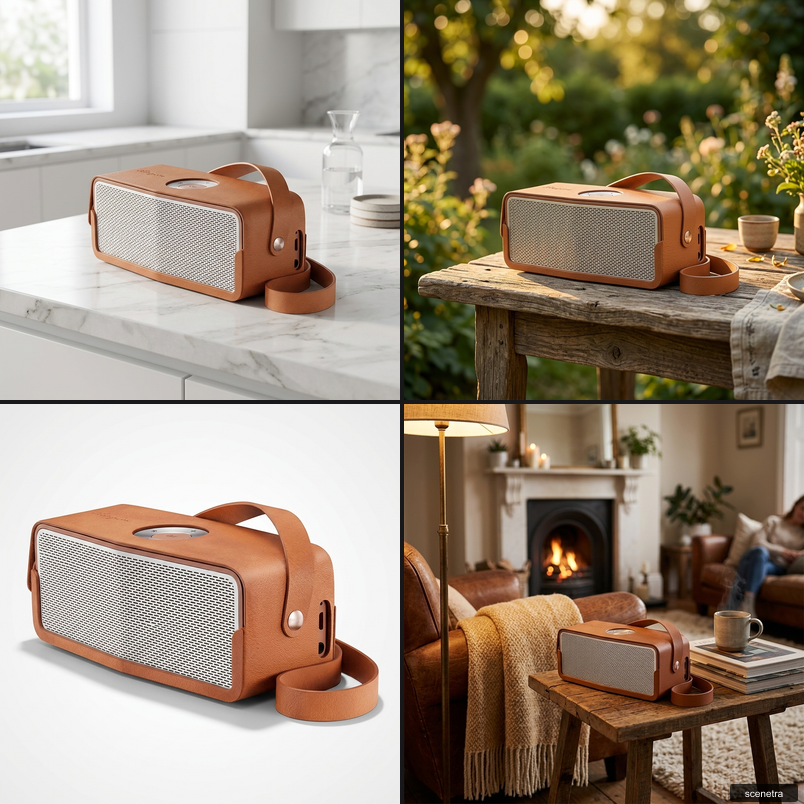
One run takes your photo through a full product-photography pipeline: background removal, AI staging into four distinct scenes — marble kitchen counter, sunlit garden table, dramatic studio backdrop, and cozy living room — and a crisp 2x upscale on every output. Four PDP-ready images that replace a $300+ shoot for under a dollar of compute.
Use cases
E-commerce listings
Fill your PDP gallery with varied, professional scenes from the one photo you already have.
Seasonal refreshes
Re-run with adjusted scene prompts to keep listings and campaigns seasonally fresh without reshoots.
Marketplace A/B tests
Test lifestyle scenes against white-background shots to see what converts.
Frequently asked questions
Upload one product photo. The app removes the background, stages the product into four professional scenes — kitchen, garden, studio, and living room — and upscales each result for crisp detail.
Any clear, well-lit photo showing the whole product. Phone photos work — the background is discarded anyway, and the upscaler recovers fine detail.
New Scenetra accounts include 100 free credits, which covers your first full four-scene run. After that, buy credits.
A studio shoot costs $300+ and takes days; this run costs under a dollar in compute and takes minutes. For hero campaign imagery you may still want a shoot — for listings and volume, AI covers it.
Yes — each scene is a prompt on the underlying board. Open it in Scenetra to swap the kitchen for a beach, change lighting, or add more scenes.
Every output goes through a crisp 2x upscale designed for product detail — clean edges, readable labels, print-friendly sizes.
How it works
Fill in the form
Upload your images and enter your prompts — no node editor needed.
Generate
Hit generate and the AI workflow runs automatically behind the scenes.
Download or customize
Get your results instantly, or open in the full workspace to tweak everything.
Models behind this tool
Related tools
AI Fashion Photoshoot Generator
Upload your clothing photos and get a full AI fashion photoshoot — a generated model wears your garments across styled, cinematic shots.
AI Product Animator
Animate a product photo into a short, ultra-realistic promo clip — background removed, product restaged, then brought to life with camera motion.
AI Lookbook Generator
Turn product photos into a styled four-panel lookbook grid — one polished, magazine-ready layout from a single run.
AI CGI Ad Generator
Turn one product photo into CGI video ads: liquid splash, particle burst, fire, ice, zero gravity and more effects that hit your product.